How to Draw Cute Fruits for Kids-KDP: A Creative Guide
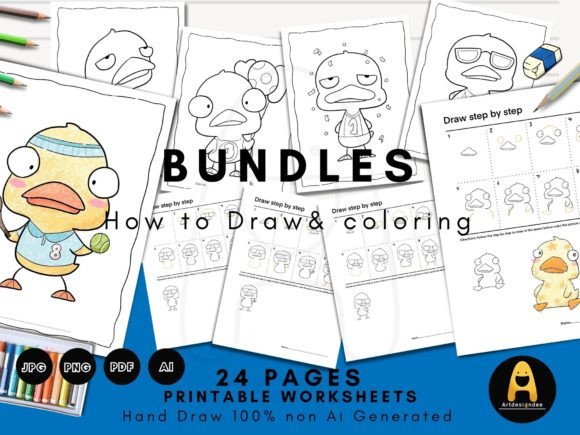
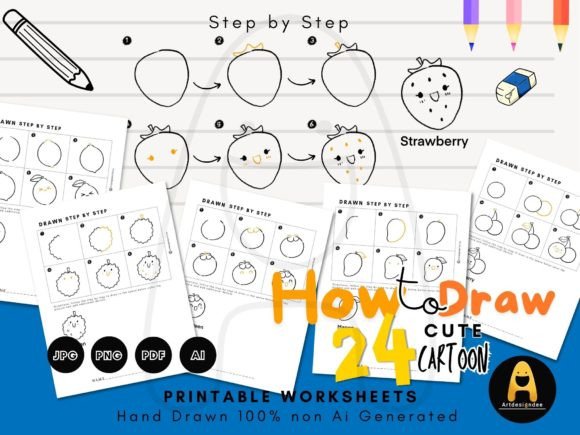
For designers, educators, and content creators, finding the right visual asset can transform a project. The "How to Draw Cute Fruits for Kids-KDP" resource is more than just a set of instructions; it's a versatile design toolkit that bridges the gap between simple doodles and professional, engaging content. This collection of step-by-step drawing guides, featuring 24 adorable summer fruits and cartoons, is crafted to make drawing accessible and fun, but its applications extend far beyond a child's coloring book.
Understanding the Visual Style and Appeal
At its core, this resource embodies the kawaii aesthetic—characters and objects designed to be cute, often with large eyes, simple shapes, and friendly expressions. The visual personality is approachable, joyful, and inherently engaging. Each fruit, from a smiling strawberry to a cheerful pineapple, is broken down into basic geometric forms, making the process of drawing them feel achievable for anyone. This simplicity is its strength. The style is clean, with clear lines and a focus on recognizable shapes, ensuring high readability even when printed at smaller sizes. The overall appeal lies in its universal charm; it connects with a sense of playfulness and nostalgia, making it a powerful tool for creating content that resonates emotionally with audiences of all ages.
Practical Applications Across Creative Projects
The utility of this drawing guide package is remarkably broad. As a design asset, it serves multiple functions across various domains.
- Publishing & KDP: This is its native environment. Use the worksheets as interior pages for activity books, children's drawing guides, or summer-themed learning materials. The included printable formats (JPG, PDF, PNG) are ready for immediate upload to platforms like Amazon KDP.
- Branding & Marketing: The cute fruit illustrations can be adapted into a unique brand identity for businesses targeting families, health-conscious consumers, or educational services. Imagine a juice bar logo featuring a doodled lemon, or social media graphics for a summer camp using these cheerful characters. They inject personality and approachability into a brand's visual language.
- Digital & Web Design: The PNG and vector (AI) files are perfect for creating custom icons, website banners, or newsletter graphics. They add a handcrafted, human touch to digital interfaces, improving user engagement and breaking up text-heavy content.
- Packaging & Product Design: For small businesses selling homemade goods, crafts, or children's products, these illustrations can decorate labels, tags, or packaging. A jam jar with a cute, hand-drawn fruit on the label tells a story of care and quality.
- Content Creation & Social Media: Bloggers and marketers can use the step-by-step process itself as content. Create a reel or a series of posts showing the "how-to" process, driving engagement. The final drawings make for appealing Instagram posts, Pinterest pins, or YouTube thumbnails.
Influence on Design Elements and Audience Engagement
Integrating these illustrations thoughtfully influences key design principles. They establish a clear visual hierarchy, guiding the viewer's eye to key information. In editorial design, a small doodle can break up long columns of text, making a page more inviting. The style promotes brand perception as friendly, creative, and trustworthy. Consistency is easily maintained when using a single cohesive set of illustrations, strengthening brand recognition.
From a typography perspective, these drawings pair exceptionally well with certain font styles. To maintain the playful, handcrafted feel, consider pairing them with a handwritten font or a rounded sans serif font. For a more modern contrast, a clean serif font can create an interesting balance between whimsy and professionalism. The key is to ensure the font choice complements the illustration's personality without competing with it. This thoughtful font pairing enhances overall readability and creates a cohesive brand identity.
Guidance for Selection and Implementation
When evaluating this resource for a project, consider the following:
- Project Fit: Does your target audience appreciate a cute, approachable aesthetic? This style is ideal for children's education, food blogging, wellness brands, and any project aiming to evoke warmth and simplicity. It may be less suited for ultra-corporate or formal contexts.
- File Format Needs: Assess your technical requirements. The ready to print PDF and JPG are perfect for direct publishing. The PNG files with transparent backgrounds are essential for layering in graphic design software. The Ai / Vector file offers the ultimate flexibility for scaling, editing, and customization without loss of quality, a true asset for any serious designer.
- Testing and Integration: Don't just insert the drawings. Test them within your layout. How do they look at 50% scale? Do they maintain clarity when placed next to your chosen typeface? Use the practice sections to ensure the step-by-step flow works for your end-user, whether it's a child or an adult learner.
- Licensing and Authenticity: A critical note is that every piece in this collection is hand-drawn. This authenticity is valuable, especially in an era of AI-generated art. The creator's note about intentional, hand-crafted work adds a layer of trust and quality. Ensure the license (typically included with purchase) covers your intended commercial use.
The "How to Draw Cute Fruits for Kids-KDP" package is a robust creative resource. It provides the raw material for delightful design, but its true value is unlocked when applied with intention—understanding its style, knowing its strengths, and integrating it seamlessly into your broader visual strategy. It proves that sometimes, the most effective design tool is one that starts with a simple, joyful doodle.